

Voice Mode
Voice Mode lets you dictate text instead of typing it. Speak your test steps, requirements, or exploratory testing notes, and Testomat.io writes them into the editor for you. Dictating saves time on long test steps and gives an option to people who find typing hard.
Turn Voice Mode on
Section titled “Turn Voice Mode on”Voice Mode is part of the AI-powered features, so it follows the same setting.
- Open your project settings.
- Enable AI features.
The microphone icon appears in every editor that supports dictation.
Dictate the text
Section titled “Dictate the text”- Open the field you want to fill in:
- test description,
- suite description,
- requirement,
- comment,
- TQL filter,
- Chat with Tests input.
- Click the Dictate icon.
- Speak your text.
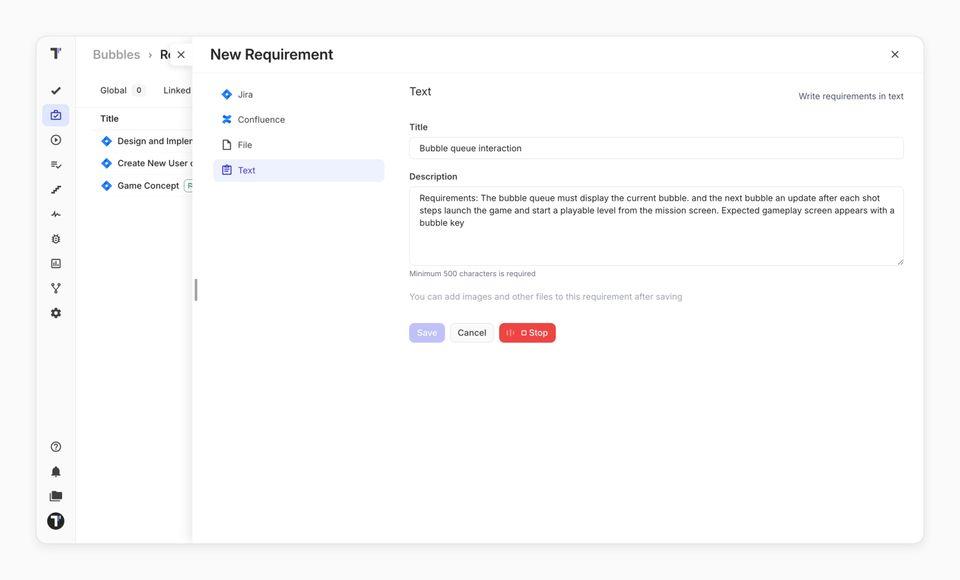
- Click Stop when you finish.
The button turns red while it records, and the bars on it move when Testomat.io hears you. AI improves the grammar, punctuation, and formatting as it goes, and once more after you stop.
What to expect while recording
Section titled “What to expect while recording”| Behavior | What it means |
|---|---|
| Only one field records at a time | The Dictate button is disabled in every other field until you stop. |
| Text is in short bursts | Audio is sent for transcription in segments, so text appears during the recording. |
| English by default | Dictation uses English unless your project sets another AI language. |
| Closing the editor stops the recording | Navigating away ends the session — click Stop to keep the text. |
If this doesn’t work:
- No microphone icon, or a message asking you to enable AI features — AI is off for the project.
- Microphone access denied — allow microphone access for
app.testomat.ioin your browser settings, then click Dictate again. - No sound recognized. Please try again. — nothing audible was captured. Check that the right input device is selected in your system settings.
- Transcription failed or Transcription timed out — the request did not reach the service. Record a shorter passage and try again.
- The text is unformatted — AI formatting was unavailable at that moment. The transcription is still yours to edit.